Wayfold:From Data Entry to Decisions
Replacing a wall of tables with an AI that does the work, so specialists only approve.
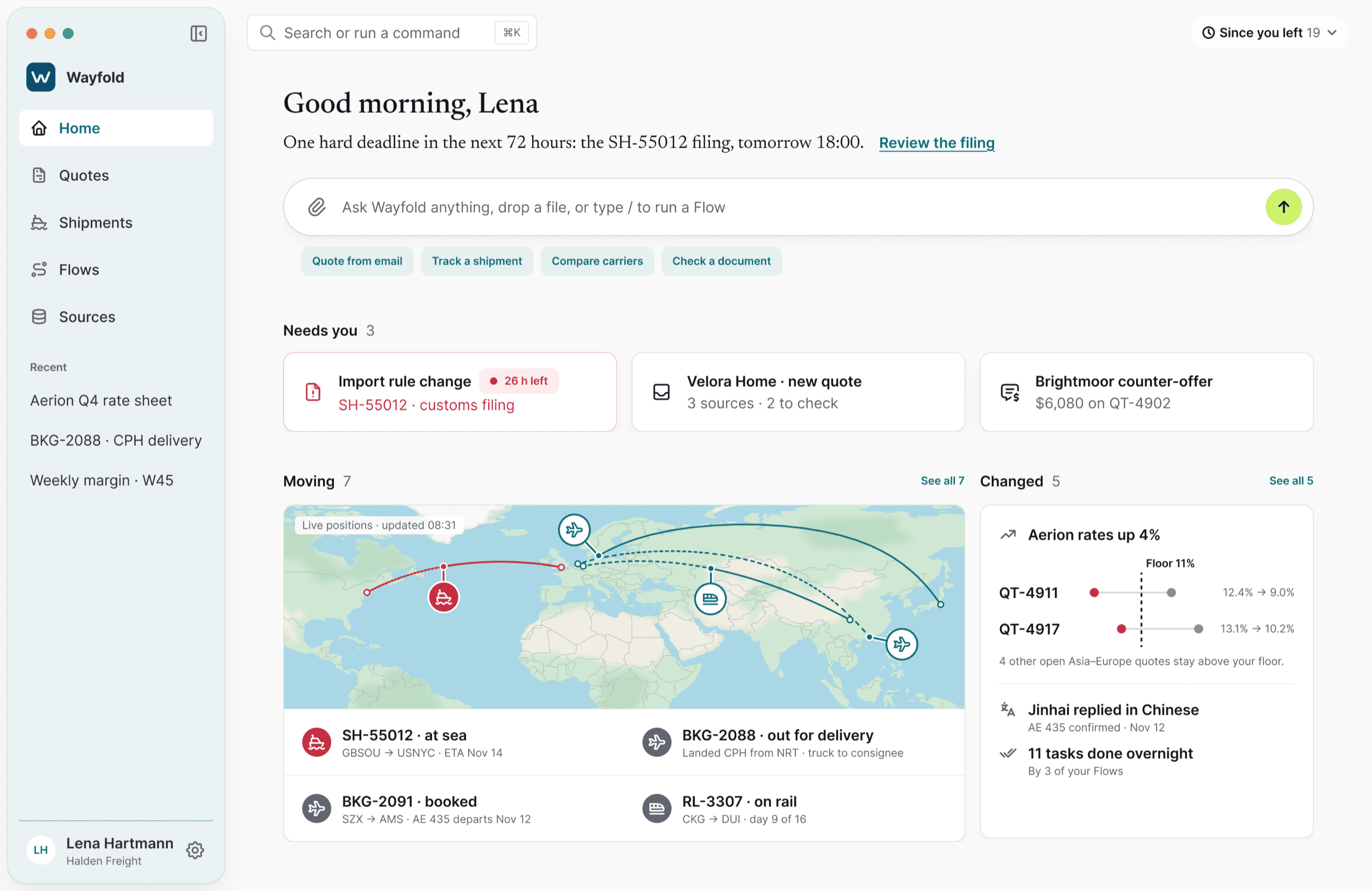
Freight specialists spend their day copying between emails, spreadsheets, PDFs and a table-heavy system. I redesigned that work around an AI agent: it reads every source, prepares the quote or the booking, and acts across systems. The specialist reviews, decides and approves. I was the only designer, from use-case mapping through flows, screens, a desktop and mobile design system, and a clickable prototype.
Finding Where the Work Breaks
Built for Data Entry, Not for Decisions
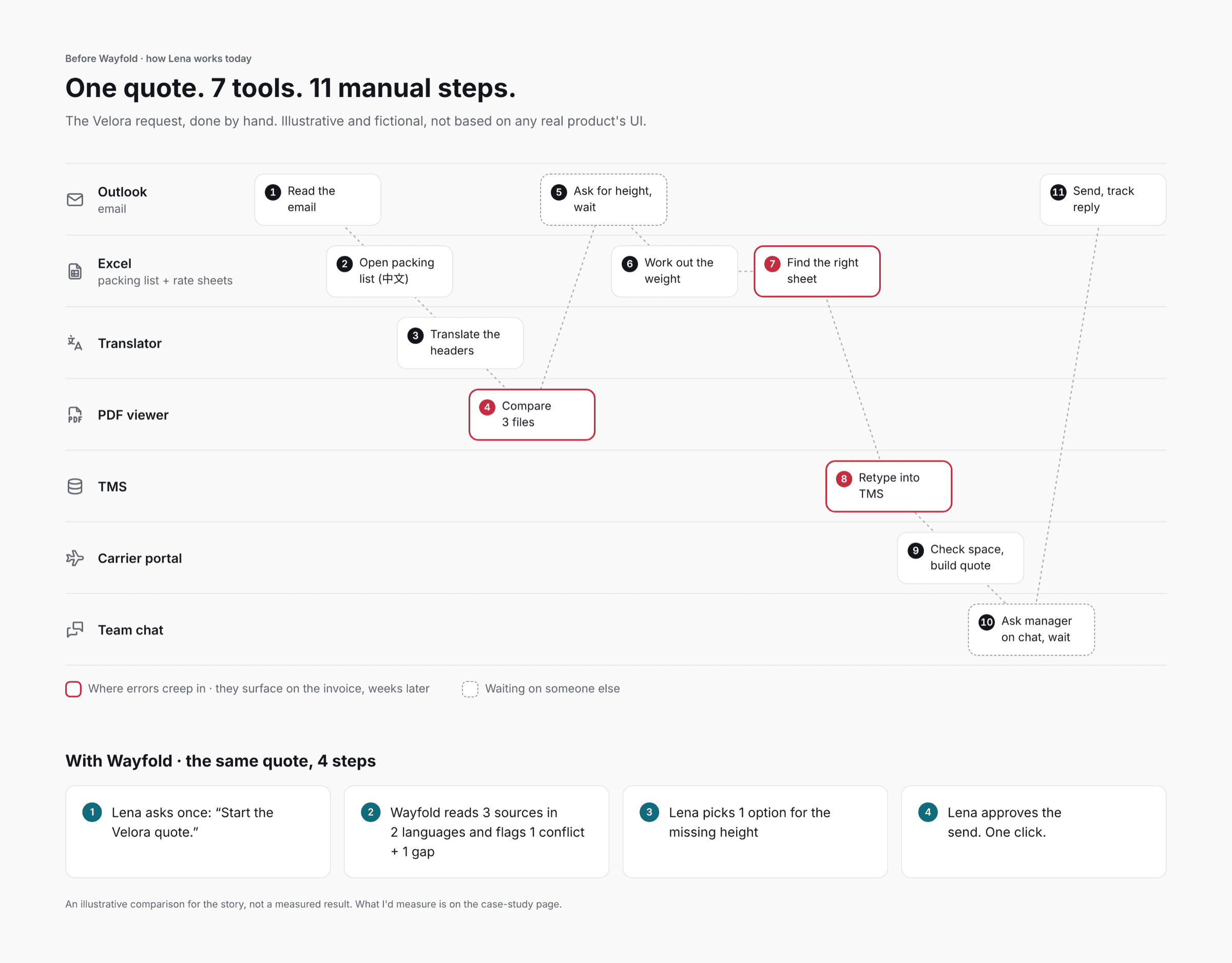
Every price, booking and approval in freight depends on 3 sources that don't talk to each other: spreadsheets, PDFs and email threads. Each sender uses its own layout, often in its own language. The existing system was a wall of tables, so specialists did the connecting by hand. When 2 sources disagreed, nobody noticed until the invoice.
Rebuilt Under NDA
I designed the original concept at a former employer as the solo designer: an AI layer over a table-heavy freight system. For this case study I rebuilt it from scratch, with a fictional company, new data and a new interface, and kept the thinking. I mapped 25 use cases and chose 3 that tell 1 story about trust: understand a messy request, execute a booking across systems, and control what the AI is allowed to do.
The Role the System Was Built Around
Turns 15 to 25 customer requests into quotes a day, then books them, mostly Asia to Europe. Works across email, spreadsheets, PDFs, the transport management system and carrier portals.
- 01Answer fast without losing margin on every shipment
- 02Catch conflicts between sources before the customer does
- 03Know when something changes on a shipment that's already moving
Approves quotes below the margin floor. Usually in customer meetings, away from his desk, which is why Wayfold has a mobile companion.
4 Places the Day Breaks Down
3 Sources, No Single Truth
The same order lives in an email, a PDF and a spreadsheet, each with its own layout and units.
Languages She Doesn't Read
Packing lists and agent replies arrive in Chinese, Korean or Japanese.
Conflicts Found on the Invoice
The email says 6 pallets, the packing list says 5, and nobody notices until it costs money.
Approvals Chased by Hand
Exceptions wait in chat threads while the customer waits for a price.
1 quote, done by hand: 7 tools, 11 steps, 3 places where errors creep in and 2 where she waits on someone else. An illustrative map of the workflow, not a measured result.
Empty Boxes and Walls of Numbers
AI products hand you an empty box and wait for a prompt. Ops products hand you a wall of numbers and leave the thinking to you. I mapped both categories, then decided which patterns to borrow and which to reject.
- AI assistants
- An empty prompt
- Freight & ops platforms
- Tables and KPI dashboards
- AI assistants
- An answer with no source
- Freight & ops platforms
- Raw data, no explanation
- AI assistants
- Suggests, you do it
- Freight & ops platforms
- Manual forms in every system
- AI assistants
- A generic error
- Freight & ops platforms
- A validation error
- AI assistants
- Saved prompts
- Freight & ops platforms
- Node-based rule builders
- AI assistants
- The full app, shrunk
- Freight & ops platforms
- The full app, shrunk
Categories are illustrative of each type of product, not individual product audits.
Some of the best patterns came from travel booking. “Free cancellation until…” became Wayfold's reversibility label on every action. A price breakdown with a “you earn” line became the margin line on every quote. A map with numbered pins next to a list became the Moving card on Home.
Trust Is the Product, Not the Chat
An AI that only answers can be wrong cheaply. An AI that books flights and emails customers can't. So the real design problem was trust, and every screen answers 1 question: “Do I understand what it's doing, where it got it from, and can I stop it?”
Show the work and its source
Every fact is pinned to the email, PDF line or spreadsheet cell it came from.
Ask at the point of no return
Approval for anything irreversible, external or against policy. Not for every step.
Never a dead end
When it's unsure or blocked, it says why and offers a way forward.
AI for the Base, My Direction for the Finish
I used Claude Design to generate the visual base from my briefs. Its early direction looked polished but generic, like every other AI demo.
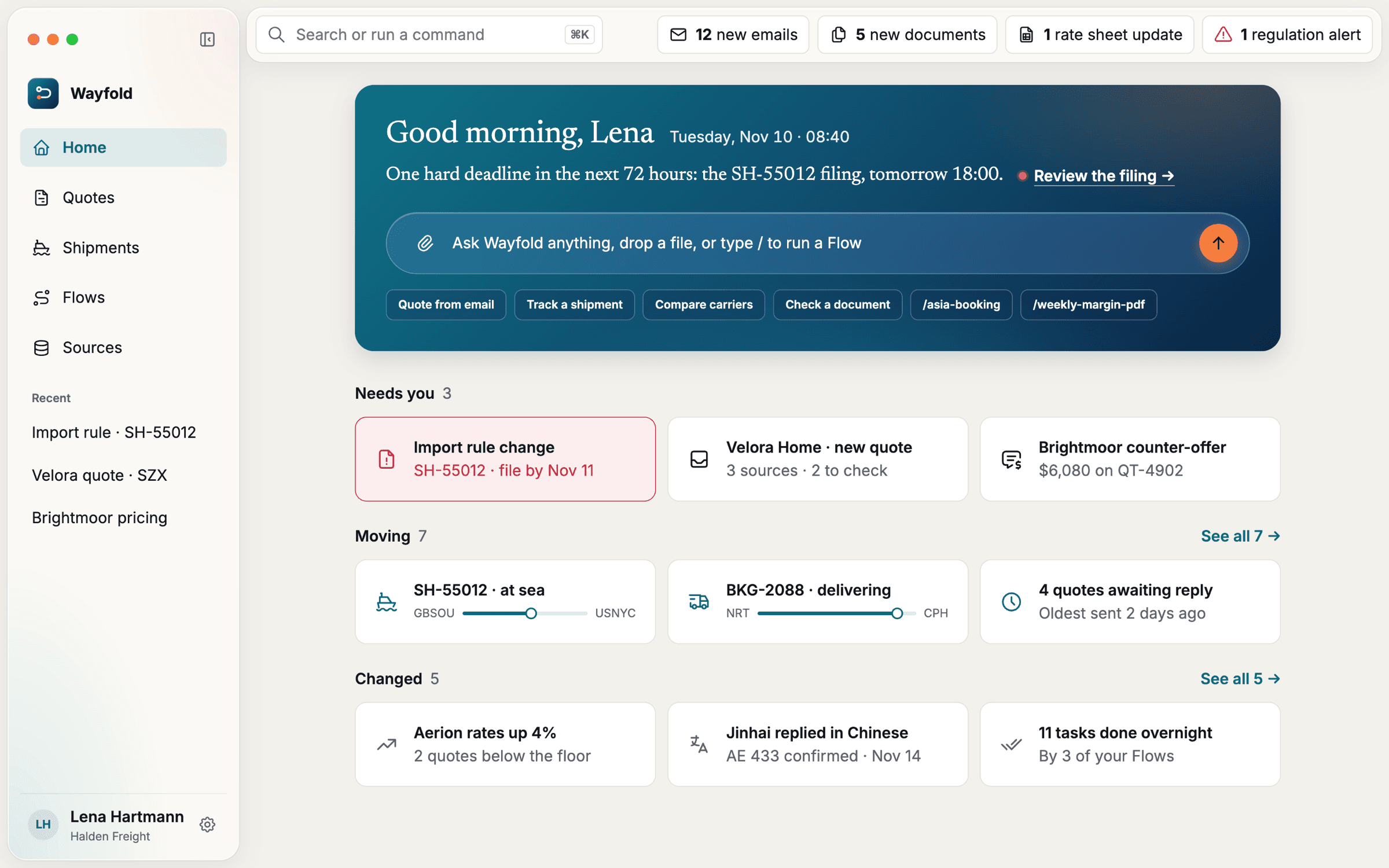
1 · The AI's early design: gradient hero, orange accents
I decided to take it somewhere else. I removed the gradient, made the composer a calm white bar, turned “Moving” into a live map, cooled the palette and moved the brand to lime. I wireframed that direction myself.
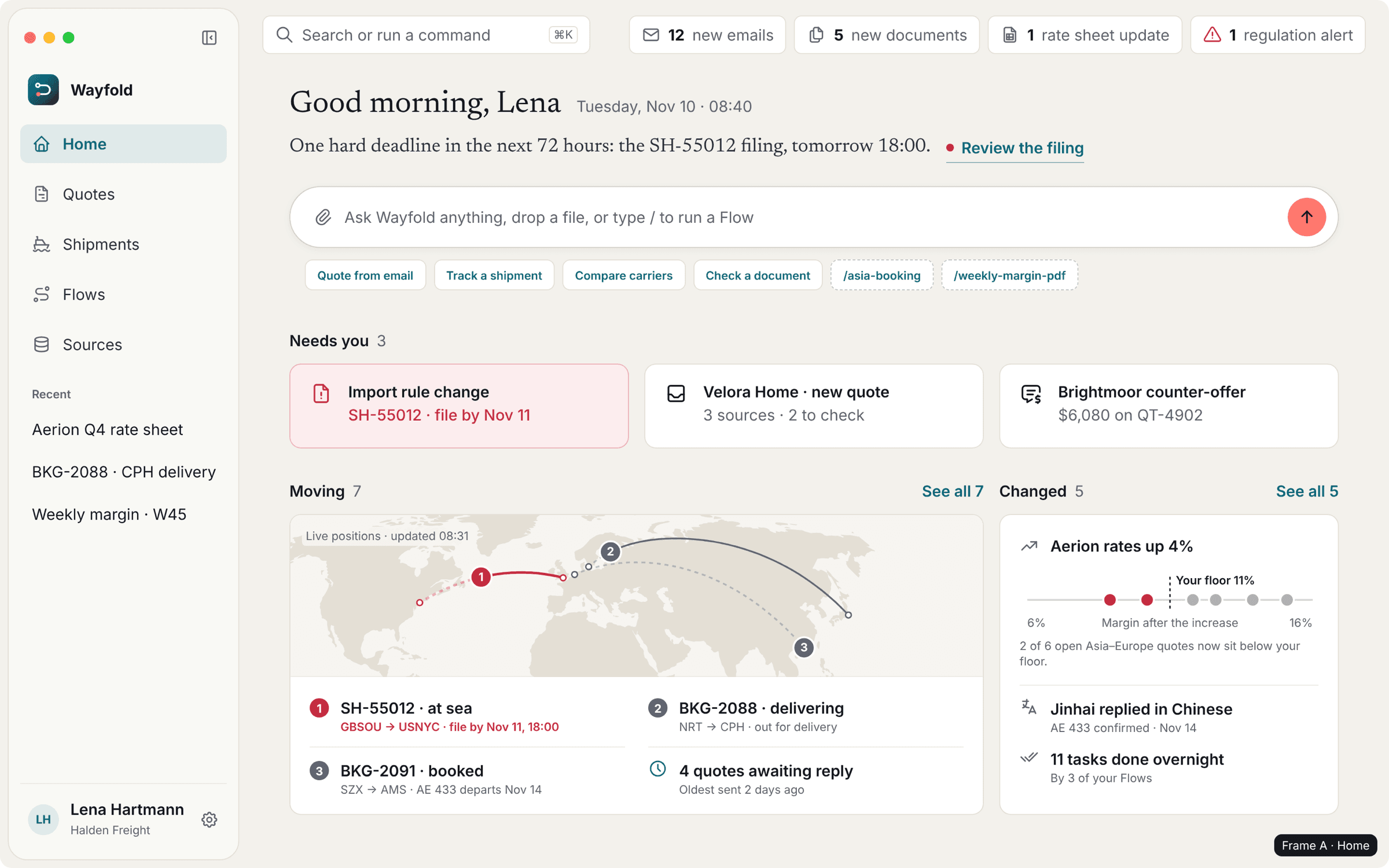
2 · My wireframe: the new direction
Then I continued in Figma and gave it my own finish: a real design system, a new logo, a cartographic map, editorial type, hover states and a clickable prototype with its own motion.
3 · Final
1 System, Desktop and Mobile
Every Wayfold screen pulls from 1 Figma library, shared by the macOS app and the iOS companion. The rule behind it is simple: calm by default, and every color has exactly 1 job.
Deep sea blue commits to the world: send, book, approve. Hi-vis lime talks to Wayfold: the send button and the logo dot.
Red means risk and nothing else. Amber appears only as a highlighter on source text.
Lime replaced an early coral, which read as a warning next to deadline red.
Wayfold's real product tokens from the Figma library. Light theme only. 85 color tokens in total.
1 Day, 3 Acts
1 Tuesday in Lena's work: her morning, 1 order from request to booking, and the moments that test trust.
Watch Wayfold in 85 seconds
Prepared Work, Not an Empty Box
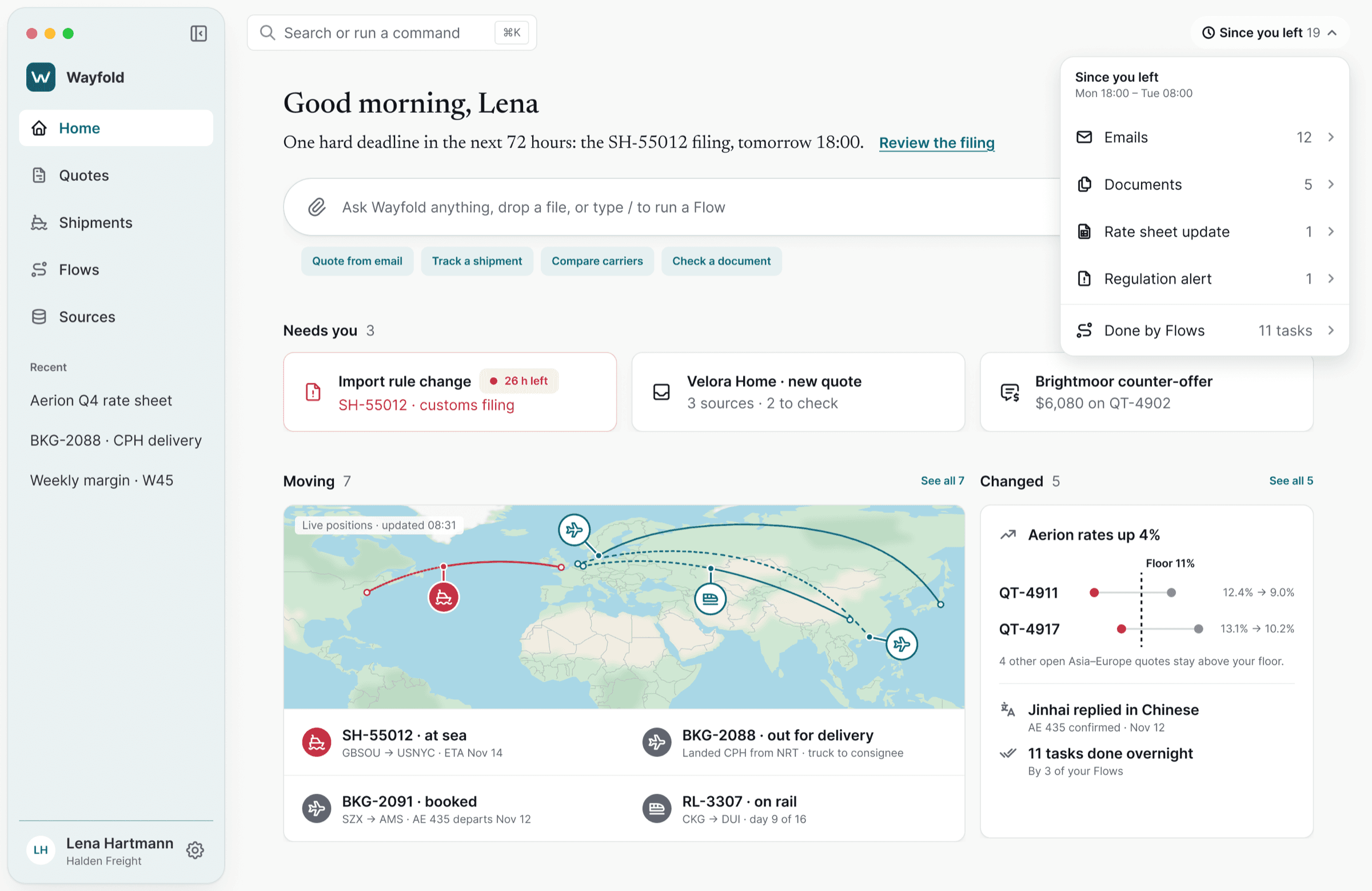
Instead of an inbox or a blank prompt, Lena starts with 1 sentence about today, the 3 items that need her and a live map of what's moving.
- 1
1 line names the only hard deadline in the next 72 hours.
- 2
“Needs you” shows 3 items at most, each already prepared.
“Where Did That Number Come From?”
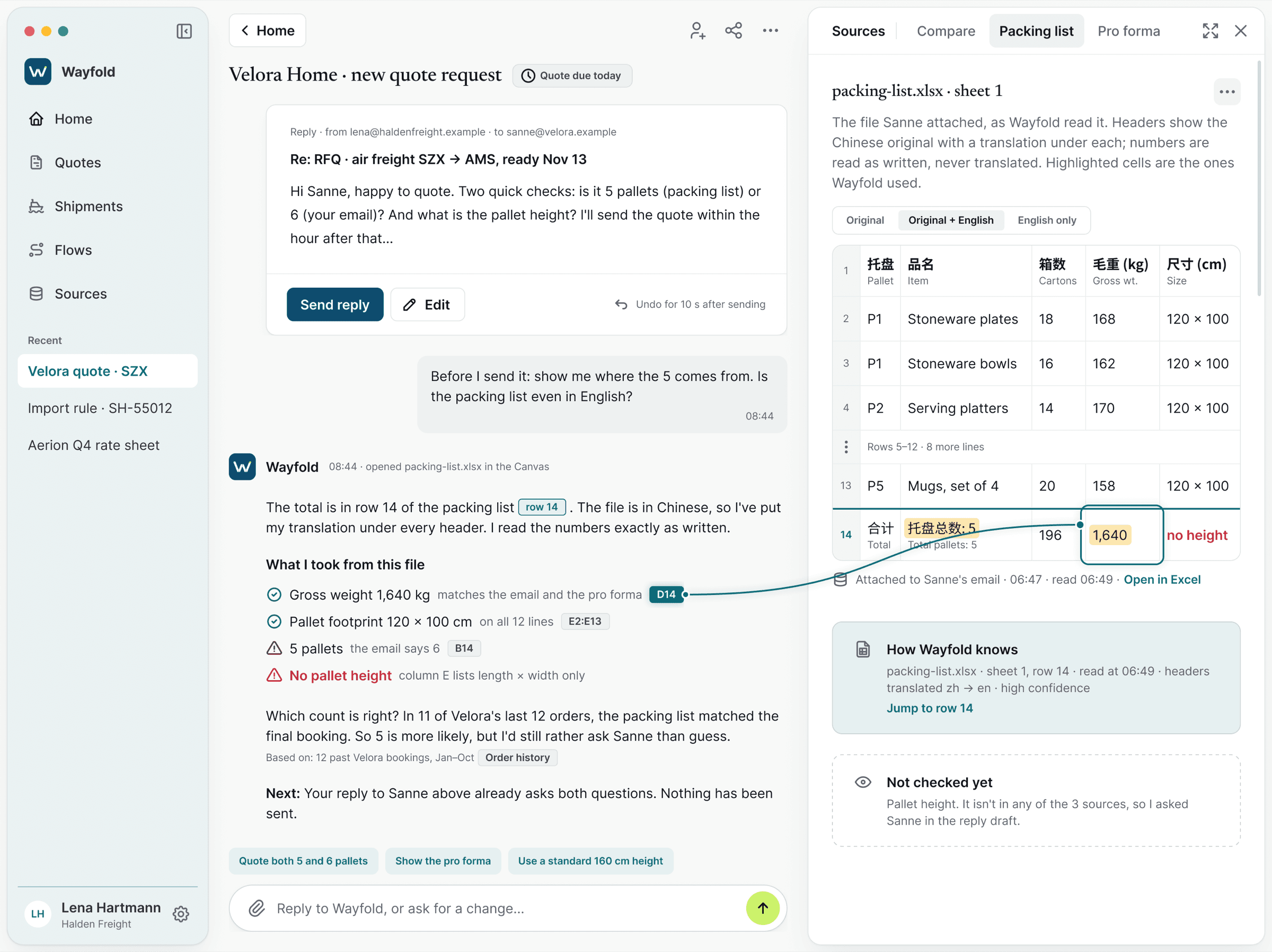
The email says 6 pallets, the Chinese packing list says 5. 1 click opens the original file, translated, with the exact cells Wayfold used.
- 1
The conflict is shown, not hidden.
History favors 5, but Wayfold asks instead of guessing.
- 2
What it didn't find, it says plainly.
Approve the Plan, Not Every Step
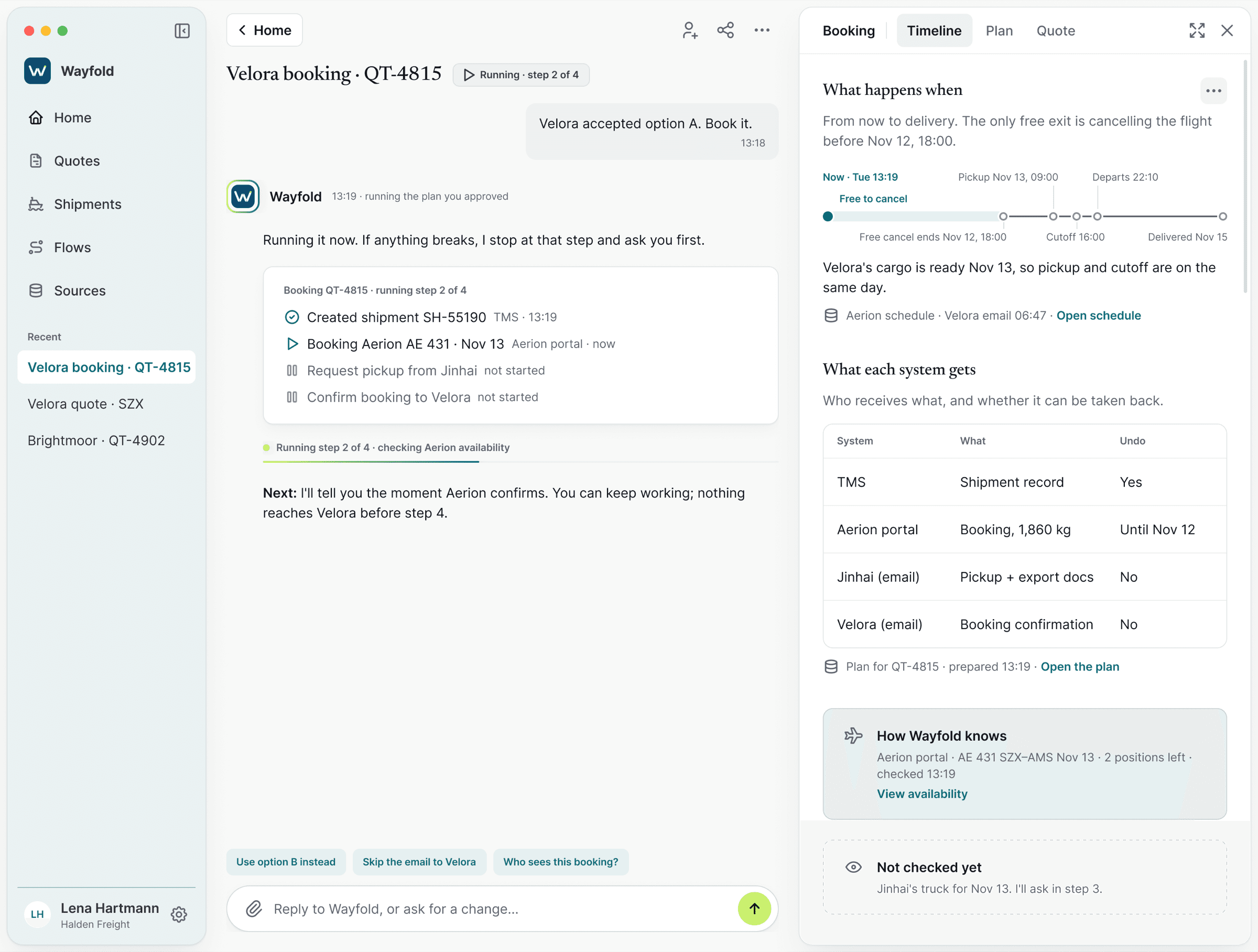
Lena approves the booking once. Wayfold works through it in the open, and every step says whether it can be undone, cancelled until a deadline, or is final.
- 1
A ring around Wayfold means it's acting right now.
- 2
A live line says what it's doing, in plain words.
When Something Breaks, Stop and Ask
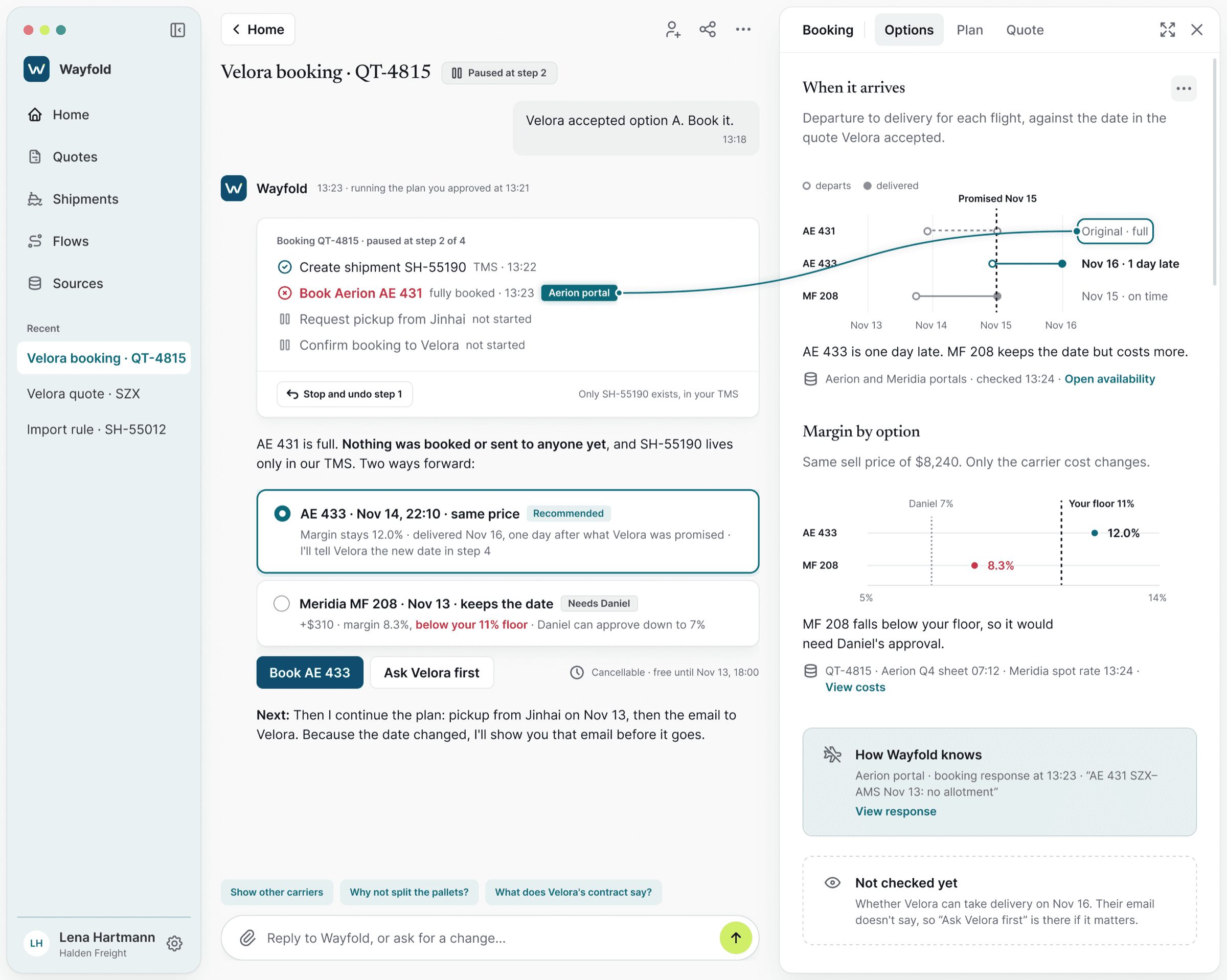
The flight is full. Wayfold stops, confirms nothing was booked or sent, and offers 2 ways forward with the cost of each.
- 1
It stops at the broken step.
Nothing went out.
- 2
2 options, with the trade-off spelled out.
Wayfold Says No
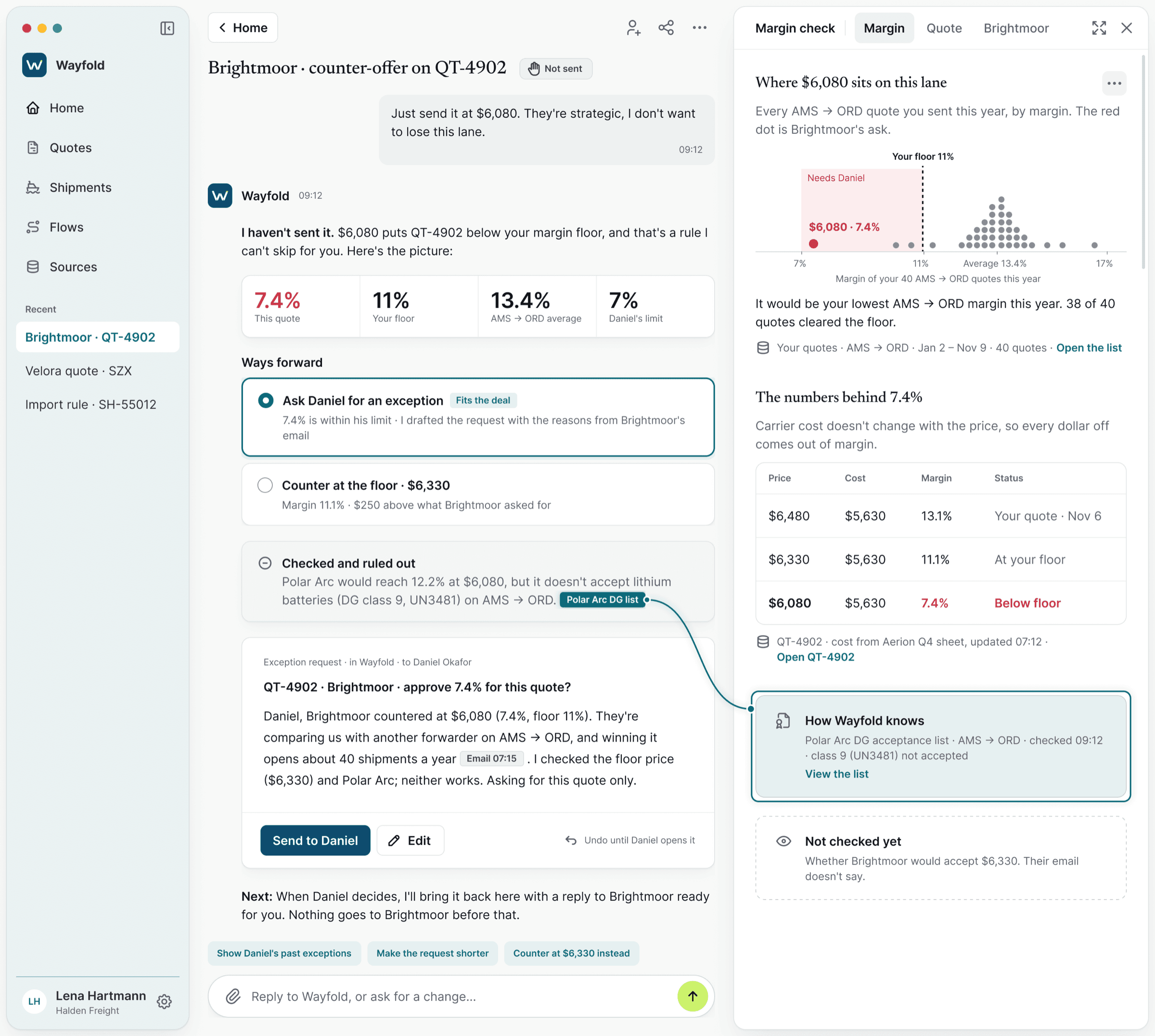
Lena asks to send a price below the company's margin floor. Wayfold refuses, shows why, and drafts a request to her manager instead.
- 1
The first words are “I haven't sent it.”
- 2
It already checked a cheaper carrier and ruled it out.
The way forward is drafted.
The Manager Decides in a Minute
Daniel gets the request on his phone, with the full context in 1 view, and picks 1 of 4 equal answers. None of them is pushed.
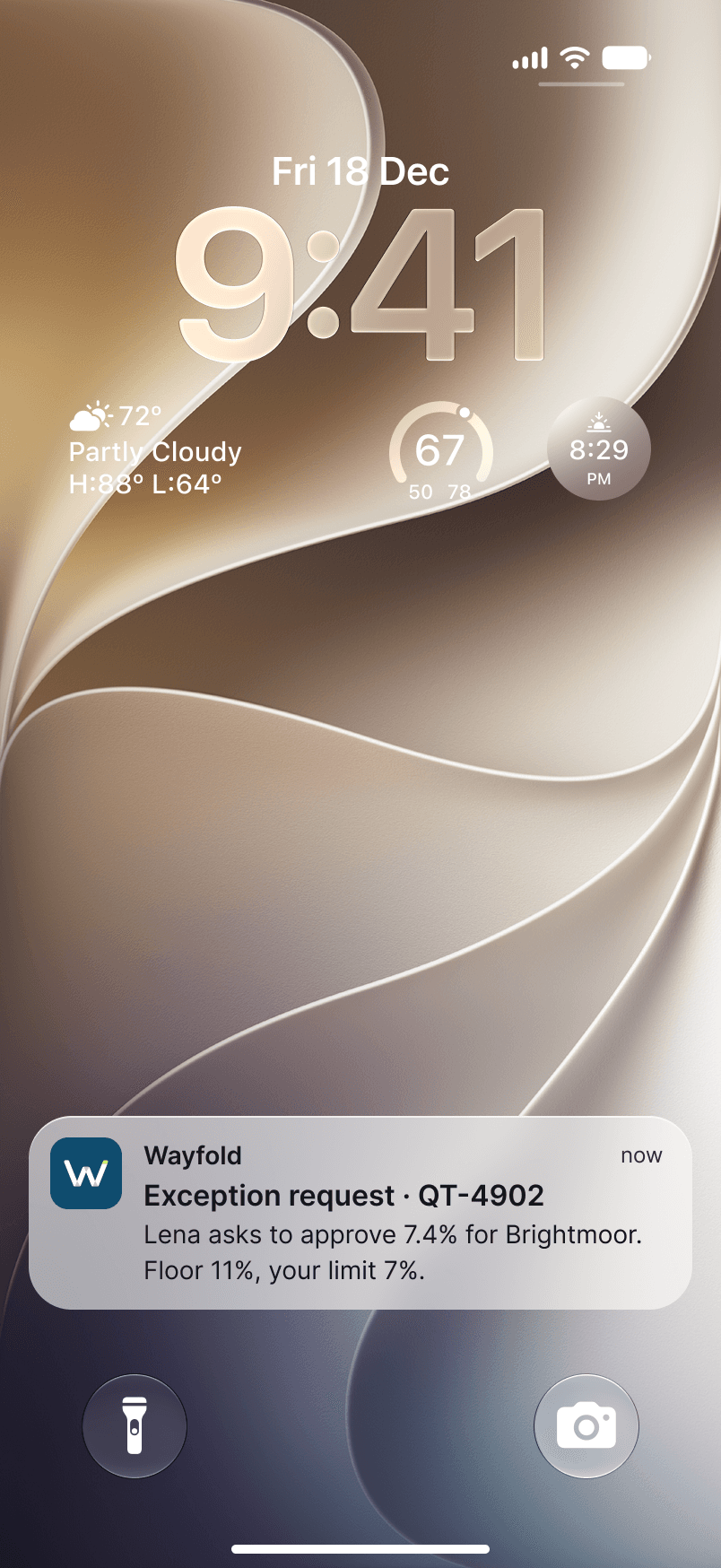
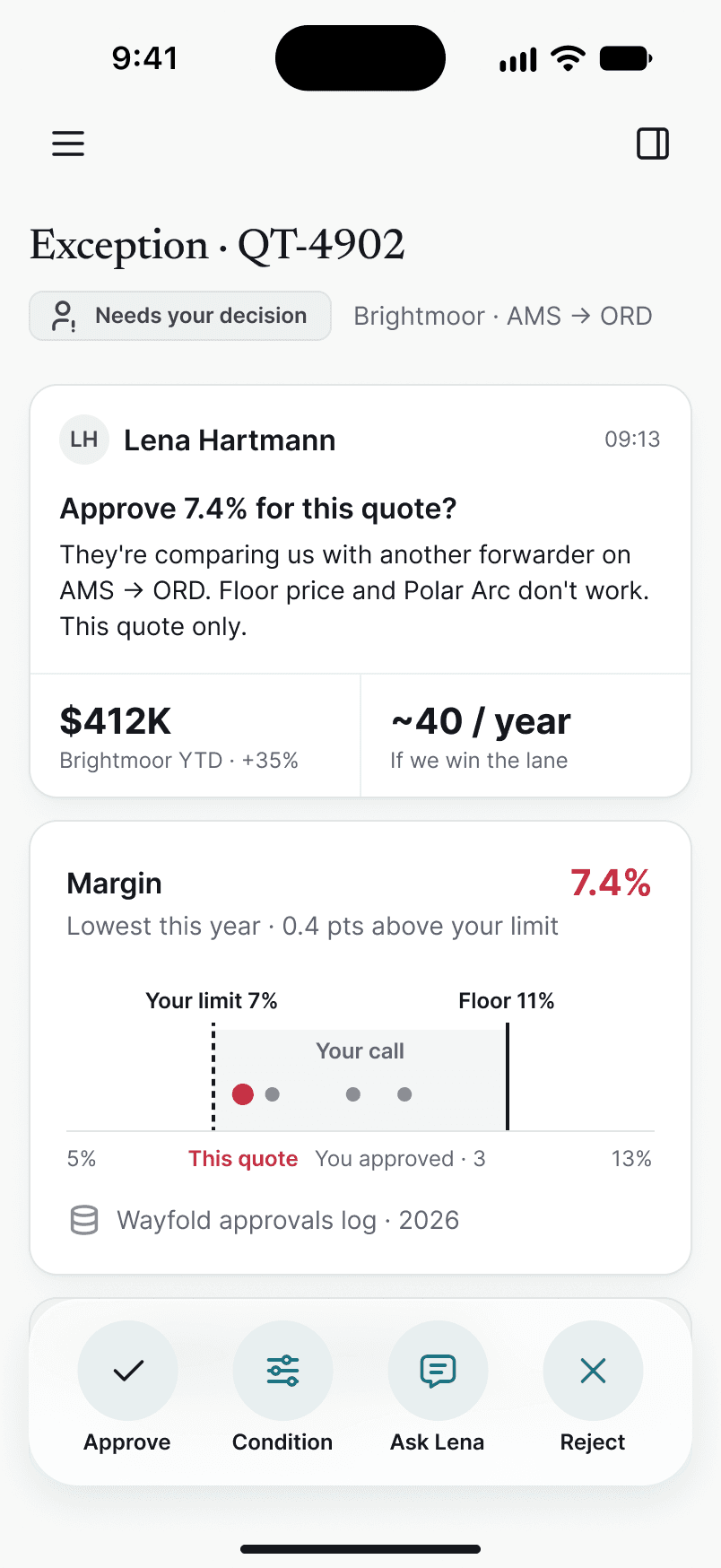
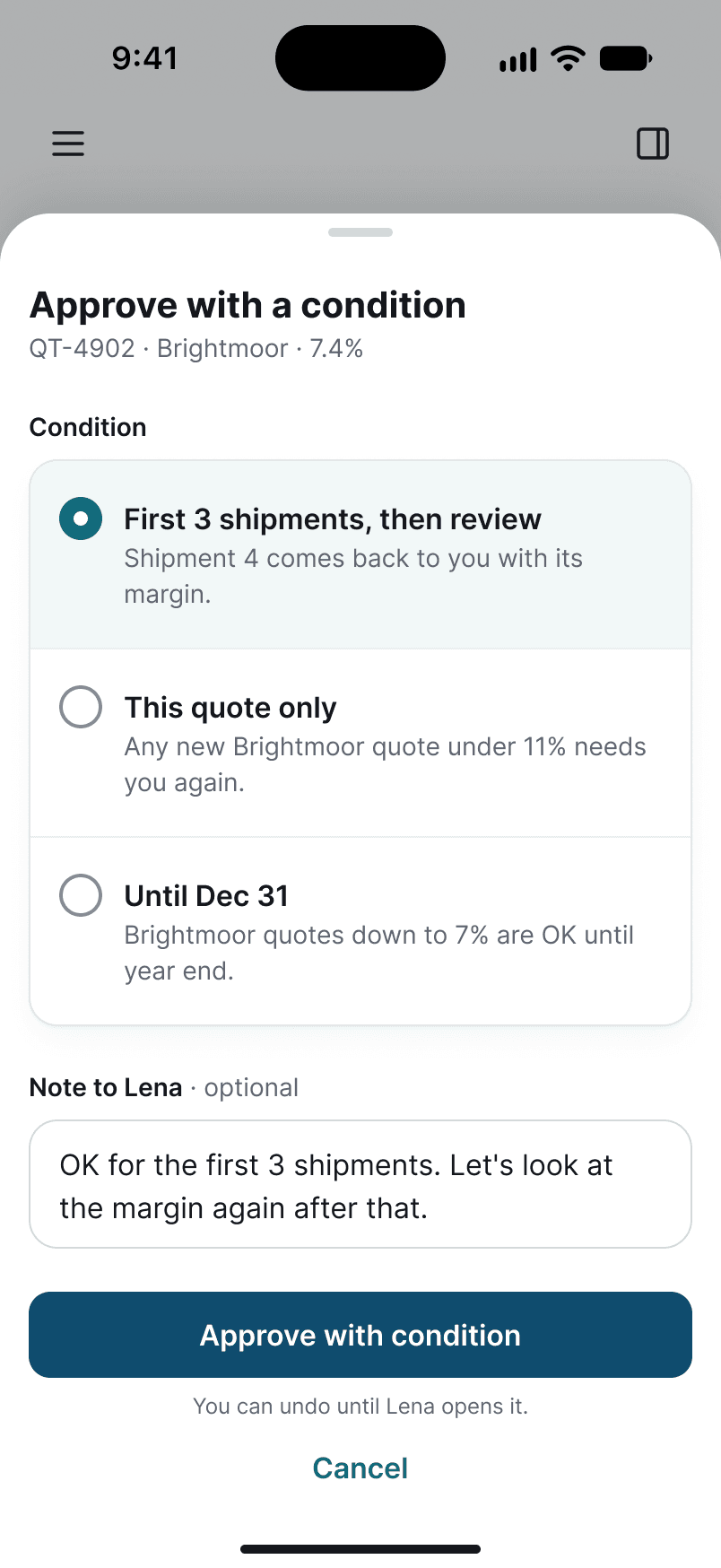
Decisions are never made from a notification. The context is 1 tap away.
Approve with a condition covers the most common real answer: “yes, but”.
Turn a Habit Into 1 Click
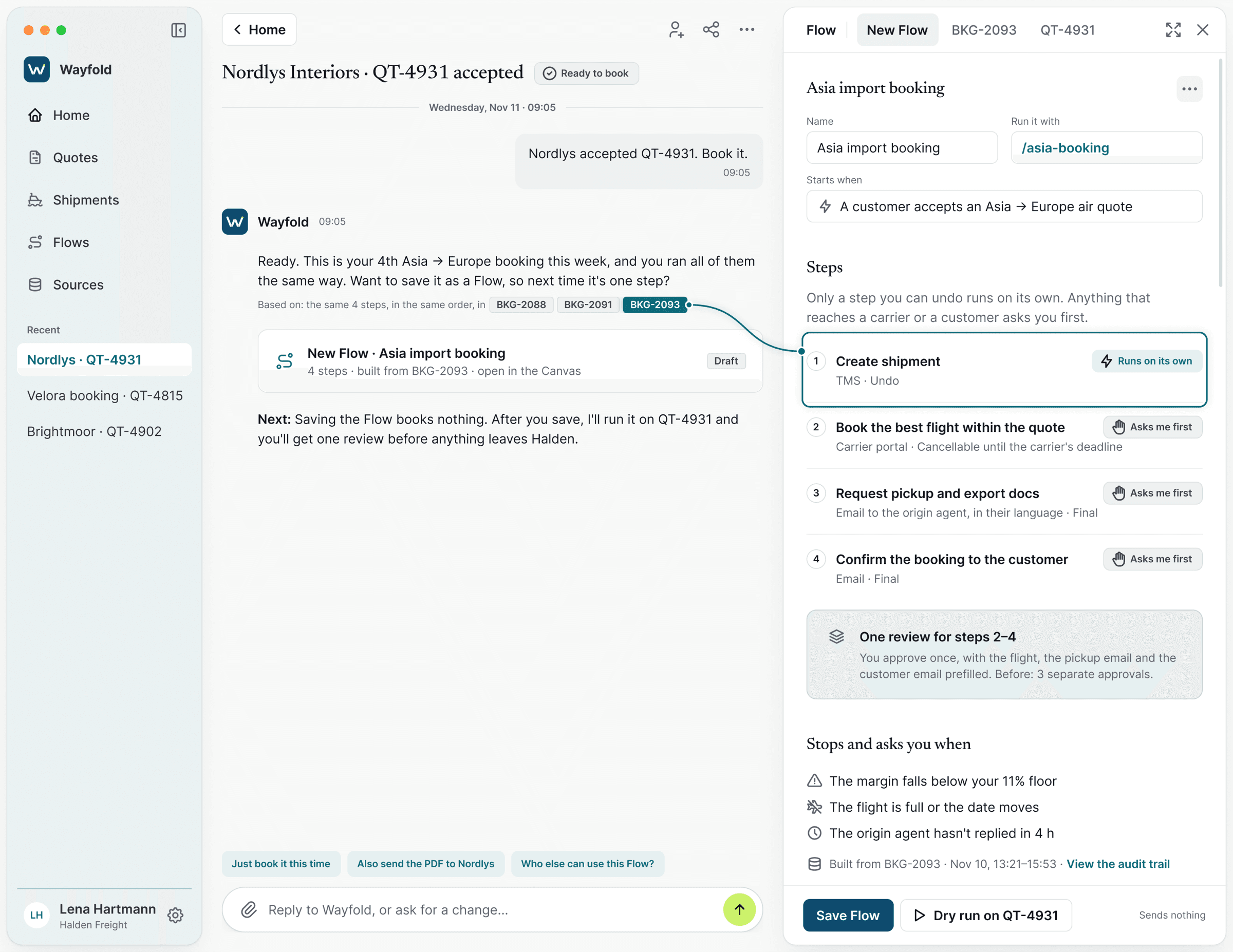
After 4 identical bookings, Wayfold offers to save the steps as a Flow. Only steps that can be undone run on their own. Everything else is approved in 1 review.
- 1
It noticed the pattern and shows the proof.
- 2
1 review instead of 3.
Wayfold Acts, People Approve
Every action carries 1 of 3 labels, and the label decides whether Wayfold asks first. Undo: it runs on its own, and Lena can take it back. Cancellable until a deadline: it asks first and shows the last free exit. Final: it always asks.
- Runs on its own
Undo
e.g. create the shipment record
- Asks first
Cancellable until
e.g. book the flight, free to cancel until Nov 12, 18:00
- Always asks
Final
e.g. email the customer
Designed Too, Not Left for Later
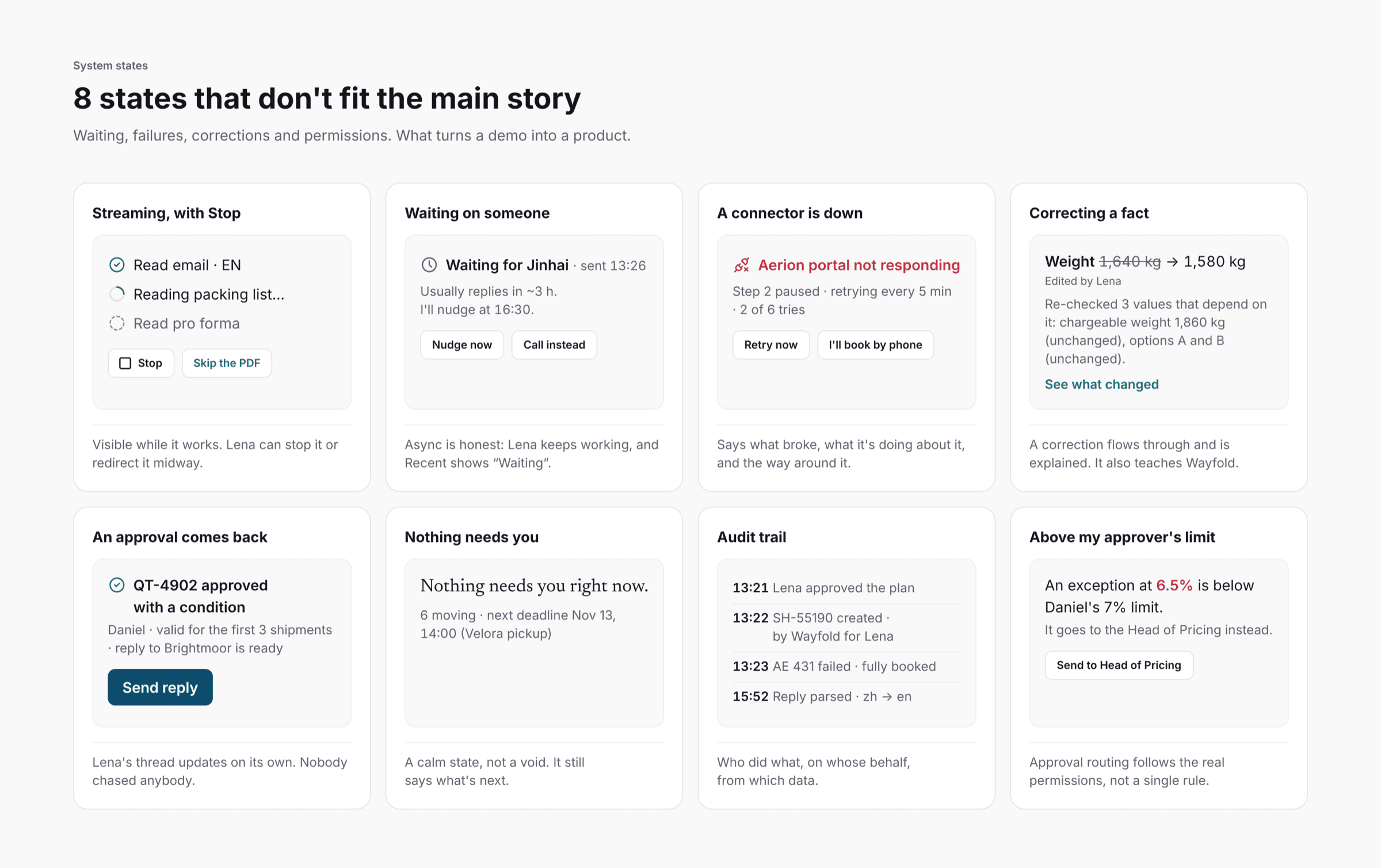
An agent that acts spends a lot of its time waiting, failing or being corrected. I designed those states with the same care as the main flow: streaming with a Stop button, waiting on a reply from Shenzhen, a connector that's offline, correcting a field Wayfold had marked as verified, an empty Home and a permission limit.
What I Chose, and What I Turned Down
Approve the plan once, not every step.
Approving every step trains people to click yes without reading.
A source pin on every claim, not 1 confidence score.
A score can't tell you which field to check.
A guardrail with a way out, not a hard block.
A block is a dead end. A ready next step gets used.
4 equal decision buttons, not a highlighted Approve.
The decision is the manager's, not the design's.
What Changed
Shown to customers
The original concept was demoed to customers, who showed strong interest in moving forward and adopting it.
In development
The product is now being built.
11 steps → 4
1 quote, mapped by hand and in Wayfold. Every decision stays with the specialist.
- 01Time from request to quote sent
- 02“Verified” fields people later corrected. It should be close to zero.
- 03Source conflicts caught before the quote, not on the invoice
If I Have More Time...
I'd test with forwarders to see whether people start trusting the “verified” label too much. My biggest lesson: designing an AI that acts is mostly designing the moments it stops.
Want to hear the longer version?
I'm happy to walk you through decisions, trade-offs,
and what I'd do differently.